SPF, DKIM, and DMARC Configuration for B2B Outbound
These authentication protocols now decide whether B2B cold emails reach inboxes or bounce.
- Written by
- Mirela Ostrowski
- Updated
- November 3, 2026
- Reading time
- 12 min read
- Sources cited
- 6 sources ↓
What this covers
Email authentication has stopped being an IT footnote and become the gate B2B outbound has to pass through. SPF, DKIM, and DMARC decide whether a cold email lands in an inbox or gets bounced before a prospect ever sees it, and as of this year, mailbox providers are enforcing that gate with rejection codes, not warnings.
The environment got here for a reason. Spam now makes up close to half of all global email traffic, and phishing volume runs into the billions of messages a day. Email sits at the center of most cyberattacks. Gmail and Yahoo responded in February 2024 with mandatory SPF, DKIM, and DMARC requirements for bulk senders, Google drawing the line at 5,000 messages a day and Yahoo leaving its threshold unspecified. Microsoft followed on May 5, 2025, and its enforcement is tighter than Google's in practice: Outlook.com, Hotmail, and M365 inboxes apply DMARC alignment checks to any sender pushing more than 1,000 emails a day to Microsoft domains, a fifth of Google's bar. La Poste joined the enforcement list in September 2025, and Microsoft has signaled that its 5,000-message threshold could disappear entirely sometime in 2026. Starting in November 2025, Gmail tightened again: non-compliant mail now faces outright rejection, temporary or permanent, instead of a nudge toward the spam folder.
None of this is a technicality for the compliance team to sort out later. Every message that bounces because of a broken SPF record or a missing DMARC policy is a prospect who never got the email, which is a pipeline number, not a DNS number.
How SPF, DKIM, and DMARC work as a system
Email as a protocol has no built-in way to prove that a message claiming to be from a domain actually came from it. SPF, DKIM, and DMARC exist to patch that gap, and each one covers a different layer of the problem.
SPF, Sender Policy Framework, is a DNS TXT record listing which IP addresses and hostnames are allowed to send mail on a domain's behalf. When a message shows up, the receiving server checks the sending IP against that list and returns one of several results: pass, fail, softfail, neutral, none, temperror, or permerror. SPF checks the SMTP envelope sender, the Return-Path or MAIL FROM address, which differs from the From: header a recipient sees in their inbox. That distinction matters later, because DMARC is what ties the two together. SPF's biggest weakness occurs during forwarding: if a message gets relayed through a server whose IP isn't in the original SPF record, the check fails even though the message is legitimate. SPF also carries a hard ceiling of 10 DNS lookups per record. Going over that breaks the record silently.
DKIM, DomainKeys Identified Mail, works differently. It attaches a cryptographic signature to every outbound message using a private key, while the matching public key sits published in DNS. The receiving server pulls that public key, checks it against the signature, and confirms nothing in the message got altered in transit. Unlike SPF, DKIM tends to survive forwarding as long as the signed content stays intact. Each sending platform uses its own selector, which is a subdomain like selector1._domainkey.yourdomain.com, so a domain sending through several platforms ends up with several DKIM records. They don't conflict with each other; they just stack.
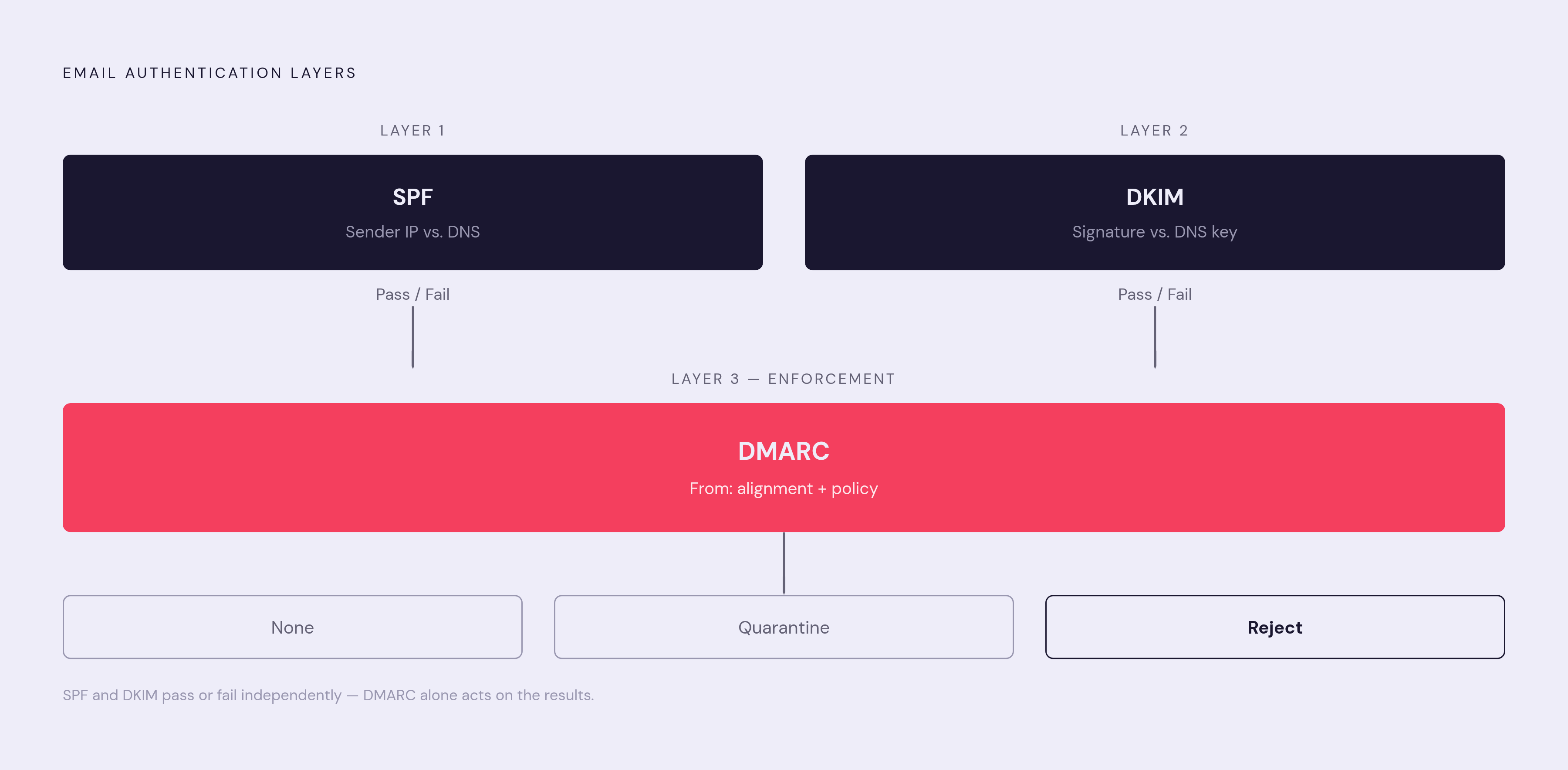
DMARC, Domain-based Message Authentication, Reporting, and Conformance, connects SPF and DKIM results back to the visible From: header. It requires either an aligned SPF pass or an aligned DKIM pass: the domain in the SPF or DKIM check has to match the From: domain the recipient sees. One aligned pass is enough to satisfy DMARC, though best practice, since the standard's 2015 release, has been to keep both aligned wherever possible. DMARC also sets the policy for what happens when alignment fails: p=none just monitors, p=quarantine routes failures to spam, and p=reject blocks them. Built into the standard is a reporting mechanism, aggregate and forensic reports that show exactly who is sending mail using the domain, which is the only real way to know what's happening before tightening the policy.
Put together, SPF and DKIM each hand back a pass or fail. DMARC is what actually does something with those results, checking them against the From: domain and enforcing a consequence. Without DMARC, SPF and DKIM operate in a vacuum: they pass or fail, but nothing acts on the failure and nobody gets a report.
How widespread non-compliance still is, and what the deliverability gap costs
The compliance numbers are worse than most sales and RevOps teams assume. A B2B email deliverability report from thedigitalbloom.com found that only 7.6% of internet domains enforce DMARC at p=quarantine or p=reject. A separate April 2026 analysis from redsift.com put the number of domains with any DMARC record at 16%, so the large majority of domains sending mail today are exposed to spoofing and to the delivery failures that come with skipping authentication.
Given the enforcement timeline, that gap isn't cosmetic. Teams without proper SPF, DKIM, and DMARC aren't flying under the radar at Gmail, Yahoo, or Microsoft right now; they're getting bounced or spam-foldered in real time.
The payoff for closing the gap is concrete. A 2025 B2B deliverability analysis, cited in a SalesHive guide, found that fully authenticated senders, meaning SPF, DKIM, and DMARC all set up with enforcement active, are substantially more likely to land in the inbox than senders without authentication. That's not a marginal edge. Fully authenticated senders reach their whole list, while unauthenticated senders reach only a fraction of it.
Some industries feel this more than others. Software and SaaS, along with retail, face a harder deliverability environment than sectors like mining or healthcare, according to the industry variance data behind the Validity Benchmark Report, which also puts global average B2B inbox placement at 83.1%. Roughly one in six B2B emails never reaches the inbox even when the send technically goes through. For a SaaS company running cold outbound in a crowded category, that's the hardest end of the spectrum to operate in, and authentication is the most direct lever available to move the needle.
If reply rates on a cold campaign have been flat for a while, the instinct is usually to rewrite the copy or narrow the targeting. Worth checking the DNS records first. A perfectly good email that never reaches an inbox produces the same reply rate as a bad one.
Setting up SPF correctly: the one record that must cover every sending source
A domain gets exactly one SPF record. Publish a second TXT record with v=spf1 in it, and both records fail, because receiving servers won't know which one to trust. The fix when adding a new sending source is always to edit the existing record, never to create a new one alongside it.
The record itself follows a fixed structure. It opens with v=spf1 to declare the version, then lists a series of include: mechanisms, each one delegating trust to a sending provider's own SPF record. It closes with an all mechanism that sets the default behavior for anything not explicitly listed: ~all applies a soft fail, -all applies a hard fail. For cold outbound sending domains, ~all is the safer starting point, since it avoids dropping legitimate messages during edge cases; Moving to -all is best deferred until every legitimate sending source has been confirmed. Under no circumstance should a record use +all or?all. Either one effectively authorizes any server on the internet to send as the domain, which defeats the purpose of having SPF.
The include values matter, and they're specific to each provider. Google Workspace uses include:_spf.google.com. Microsoft 365 uses include:spf.protection.outlook.com; the older include:outlook.com value, without the spf.protection prefix, is no longer authoritative according to senderreputation.org's August 2026 guidance. SendGrid, Mailgun, Amazon SES, and SMTP2GO each publish their own include string, and the correct one should come from that provider's current documentation rather than from memory or an old blog post. Woodpecker's SPF requirements depend on how it's configured, so the correct include value, if any, should be confirmed directly in its current documentation.
The 10-lookup ceiling is where a lot of these records quietly break. Each include: consumes some portion of the lookup budget on its own, and stacking several sending tools onto one domain can blow past the limit without any obvious error message; the record just stops resolving correctly. Microsoft 365's include alone consumes 3 of the 10 lookups, leaving 7 for everything else a domain might need. Running the record through a checker like mxtoolbox.com/spf.aspx before going live is the only reliable way to confirm it resolves within budget.
Setting one up correctly follows a fairly mechanical sequence: list every platform that sends mail for the domain, check what SPF record (if any) already exists, pull the official include mechanism from each provider's own documentation, combine everything into a single TXT record at the domain root (usually entered as @), then publish and verify once propagation finishes, typically within a few hours. And after that, the job isn't done. Old vendors and abandoned tools tend to leave their include: entries behind long after anyone stops using them, quietly eating into the lookup budget and leaving infrastructure authorized to send as the domain that nobody's watching anymore. Pruning those out periodically is part of keeping the record functional.
Setting up DKIM correctly: key generation, DNS publishing, and activation
Current best practice calls for 2048-bit keys. Shorter keys are weaker cryptographically and shouldn't be used for new setups.
A DKIM record lives at a subdomain formatted as selector._domainkey.yourdomain.com, where the selector name is whatever the sending platform assigns. The value itself starts with v=DKIM1; k=rsa; p= followed by the public key string. Domains sending through multiple platforms need a separate DKIM record for each one, published at each platform's own selector. Because the records sit at different subdomains, they never collide.
Google Workspace's setup runs through Admin Console → Apps → Google Workspace → Gmail → Authenticate email. Google generates the key pair on its end, hands over a TXT record to publish, and once that's done, signing gets switched on back in the console.
Microsoft 365 works differently, and the difference trips people up. Instead of one TXT record holding the public key directly, Microsoft uses two CNAME records, selector1 and selector2, pointing into Microsoft's own DNS namespace. And DKIM signing on a custom domain is off by default. Publishing the two CNAMEs alone doesn't turn signing on. That step happens separately, inside the Microsoft Defender portal, under Email and Collaboration → Policies and Rules → Threat Policies → Email Authentication Settings → DKIM. The two-selector setup exists so Microsoft can rotate signing keys without any downtime for the sender.
Once DNS has propagated, the record needs checking, either through an online DKIM checker such as mxtoolbox.com or by sending a test message to a Gmail address and pulling up the raw headers to look for dkim=pass. A "250 OK" response from the sending server only confirms the message left the building; it says nothing about what happened once it arrived. Before ramping up any campaign volume, confirm the selector has actually gone live in DNS. A DKIM record that hasn't finished propagating will fail every single message until it does.
Setting up DMARC correctly: starting at p=none, reading reports, and progressing to enforcement
DMARC is a single TXT record published at _dmarc.yourdomain.com. It's built from a handful of tags: v=DMARC1 declares the version, p= sets the policy (none, quarantine, or reject), rua= points to the address where aggregate reports get sent as daily XML summaries, ruf= optionally points to a destination for forensic reports on individual failures, and pct= sets what percentage of mail the policy applies to during a gradual rollout.
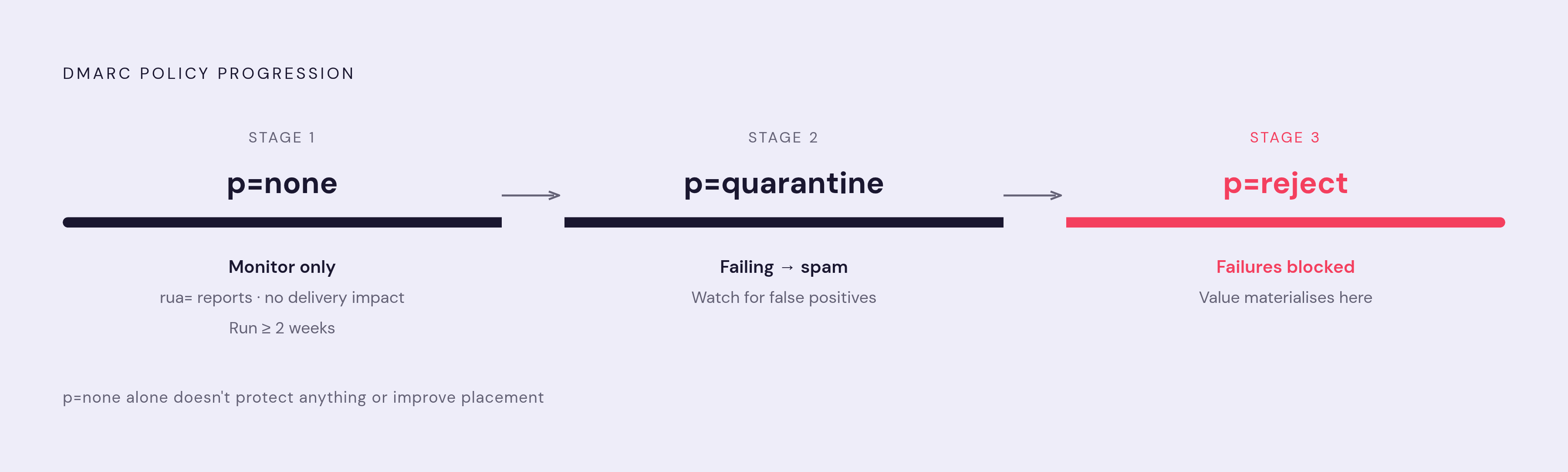
The rollout has a clear order to it, and skipping steps is where most enforcement mistakes happen. It starts at p=none with rua= pointing to a monitored inbox or a report parser, which produces visibility into what's happening without affecting delivery. That monitoring period should run at least a couple of weeks, long enough to confirm every legitimate sending source, whatever ESP, CRM, or marketing automation tool touches the domain, is authenticating and aligning correctly. Only once that's confirmed does the policy move to p=quarantine, which routes failing messages to spam instead of the inbox. From there, once quarantine has run clean with no false positives, the policy moves to p=reject and blocks failures. Sitting at p=none indefinitely is a diagnostic phase, not a place to stop, and it doesn't protect anything or improve placement.
Moving to enforcement carries weight beyond the reports themselves. A domain set to p=quarantine or p=reject is telling inbox providers, in a way they can verify, that the sender takes control of its own domain seriously, and that signal factors into deliverability on its own.
The reports matter for a more practical reason too. DMARC aggregate reports surface shadow senders, third-party tools, shared ESPs, or misconfigured servers sending mail using the domain, that would otherwise go completely unnoticed. Publishing the record itself is usually an afternoon's work, and propagation takes a few hours at most. The monitoring period at p=none takes the actual time, not the DNS work.
One record won't cover everything, either. A DMARC record on a parent domain doesn't automatically extend to subdomains or to separate sending domains; each domain actively sending mail needs its own record.
Enforcement doesn't operate in isolation from list hygiene. Google's target spam complaint rate sits under 0.10%, with a hard cap at 0.3%, while Microsoft enforces at 0.2%. Staying under those numbers means honoring unsubscribes within two days for Google and Yahoo, keeping unsubscribe links functional for Microsoft, and generally keeping the list clean, on top of getting the authentication right. Passing SPF, DKIM, and DMARC checks doesn't offset a list full of stale or uninterested addresses.
Why cold outbound requires separate sending domains and structuring the domain portfolio
Cold email behaves differently from every other kind of business mail a company sends, and the domain strategy has to account for that difference directly. A primary company domain, the one on the website, the one in the all-hands calendar invite, the one attached to the CEO's signature, is the last domain that should ever touch a cold outbound campaign. Cold sends generate bounces, spam complaints, and low engagement rates almost by design, since a portion of any list is going to be wrong, outdated, or simply uninterested. Those signals accumulate against the sending domain's reputation, which is what SPF, DKIM, and DMARC verify. Damage a domain's reputation through cold sending, and it can compromise deliverability for every other kind of mail that domain sends, including invoices, password resets, and internal communication that has nothing to do with outbound.
The standard structure separates the two entirely: a small number of dedicated sending domains, distinct from the primary domain but still recognizably tied to the company (a variant spelling, a hyphenated version, or a domain with the same brand name under a different extension), each with its own SPF, DKIM, and DMARC records configured from scratch. Spreading volume across several of these domains, rather than pushing everything through one, keeps any single domain's daily send count lower and gives a bad signal on one domain less room to sink an entire outbound program at once.
Every domain in that portfolio needs the same treatment described above: its own SPF record covering its actual sending sources, its own DKIM keys and selectors, and its own DMARC record moving through the same p=none to p=reject progression. None of that inherits from the primary domain automatically, and none of it is optional if the goal is landing in the inbox instead of bouncing at the front door. Given how many prospects a single rejected send represents, the setup work is cheap by comparison. Skipping it is.
Methodology & sources
- How email authentication works in Microsoft 365 - Microsoft Defender for Office 365
Provided technical detail on how SPF, DKIM, and DMARC function as email authentication layers, including DMARC alignment logic.
- https://en.wikipedia.org/wiki/Sender_Policy_Framework
Provided foundational detail on SPF mechanisms, result types, the forwarding problem, and the 10 DNS lookup limit.
- https://learn.microsoft.com/en-us/defender-office-365/email-authentication-spf-configure
Provided Microsoft-specific SPF configuration details, including the correct include mechanism for Microsoft 365.
- https://learn.microsoft.com/en-us/answers/questions/5989956/how-should-i-configure-spf-dkim-and-dmarc-for-micr
Supplied the detail on Microsoft 365 DKIM using two CNAME records and requiring manual activation in the Defender portal.
- https://moderninbound.com/blog/how-to-set-up-cold-email-domains-for-deliverability-in-2026
Informed the section on using separate sending domains for cold outbound and structuring a domain portfolio.
- https://prospeo.io/s/spf-dkim-dmarc-setup-cold-email
Provided setup guidance on configuring SPF, DKIM, and DMARC specifically for cold email sending domains.